

6 Office Noise Reduction Strategies That Help You Focus Instantly
When you’re trying to focus in a noisy office, silence starts to feel like the dream—just a few minutes without ringing phones, rowdy conversations, or clacking keyboards, anyone?
But total silence isn’t the perfect fix it allures to be. In fact, it can make sudden sounds feel even more jarring and distracting.
That’s because the real issue isn’t just noise—it’s speech.
Our brains are designed to pick up speech, which makes it especially hard to ignore people talking nearby. That’s why consumer-grade noise-canceling headphones fall short—they’re great for steady hums but struggle when it comes to unpredictable, high-frequency human voices.
But the solution isn’t to stop everyone from speaking. That’s neither realistic nor fair. What you need is balance: a sound environment where necessary conversations don’t constantly hijack your attention, and you can actually get through your workday without constant interruptions.
This article explores practical strategies to reduce disruptive speech noise and help you focus again. Some are quick fixes you can start using right away. Others involve broader shifts, like adjusting the office layout or encouraging better noise etiquette.
Either way, the goal is simple: to create a workspace that supports focus, not fights against it.
Why office noise feels so draining (and it’s not just in your head)
If you’ve ever found yourself rereading the same sentence over and over because someone nearby is on a call or felt oddly drained after a day in a noisy office, you’re not imagining it. Noise really does wear you out. And there’s science behind why.
Our brains are wired to register sound, whether it’s office chatter, ringing phones, clacking keyboards, printer beeps, or the low hum of heating and cooling systems. These sounds constantly compete for your attention, pulling your brain in different directions. But the one that’s hardest to ignore? Speech.
Our brains instinctively latch onto nearby conversations—even when we’re not trying to listen. That’s why someone talking three desks over can feel more distracting than the background noise of a buzzing printer or the whir of the air conditioner.
Here’s what’s actually happening inside your brain during all that noise:
- Your brain treats noise as a potential threat. When your brain registers all those sounds (especially unpredictable or sudden ones, like conversations), it kicks your stress response into gear because it perceives noise as a potential threat.
- Stress hormones kick in. This triggers the release of hormones like cortisol and adrenaline, typically meant to help you respond to threats.
- Your energy gets rerouted. Your body, without realizing it, shifts its resources to manage the stress, which drains energy meant for thinking, creating, or problem-solving.
- Fatigue sets in. The longer your brain has to manage this auditory overload—layered, competing, nonstop sounds—the more mentally foggy and physically depleted you feel by the end of the day.
In our recent study, 47% of knowledge workers said noise is a major stressor at work and keeps them from concentrating. Even more striking, 74% said working in a loud environment makes them mentally and physically tired. That’s not just a productivity issue—it’s a well-being one.
And if you've ever quietly escaped to the bathroom for a breather, you're not alone—1 in 10 employees admit to doing exactly that, just to get a moment of peace.
But what’s actually causing all that noise?
- Overcrowded workspaces. When too many people are packed into the same area, overlapping conversations, shuffling chairs, and constant movement quickly blend into a chaotic hum that’s impossible to ignore.
- Loud conversations and phone calls. In open-plan offices or coworking spaces, there are rarely any barriers or walls between teams. That means when two people are chatting a few desks away, or someone takes a phone call at full volume, it carries across the room.
- Hard surfaces. Glass walls, concrete floors, and tiled ceilings bounce sound waves instead of absorbing them, so every little noise feels louder and lingers longer.
- Noisy office equipment. Devices like printers, scanners, keyboards, and incoming email pings contribute to a constant background buzz, making it hard to stay focused.
- Intrusive external noise. Offices near busy roads, construction zones, or street-level storefronts often have sound creeping in from outside—whether it’s traffic, sirens, honking, or delivery trucks.
- Lack of noise etiquette. Without established guidelines on what’s considered “too loud,” people may unknowingly engage in disruptive behaviors, like taking calls at their desks, holding casual conversations right next to someone trying to focus, or playing videos or voice notes without headphones.
Read: Noise in the open office: Solutions to boost productivity and take control of unwanted noise
Practical noise reduction strategies that actually work
If you’re stuck in a noisy office that makes it hard to focus, here are some effective strategies that leaders can implement to create an environment where everyone can focus better.
1. Create distinct quiet and loud zones
Open-plan layouts might seem great for teamwork, but in practice, they blur the boundaries between quiet and loud work. Without physical barriers, sound moves freely—every conversation, phone ring, or side discussion becomes background noise for someone else.
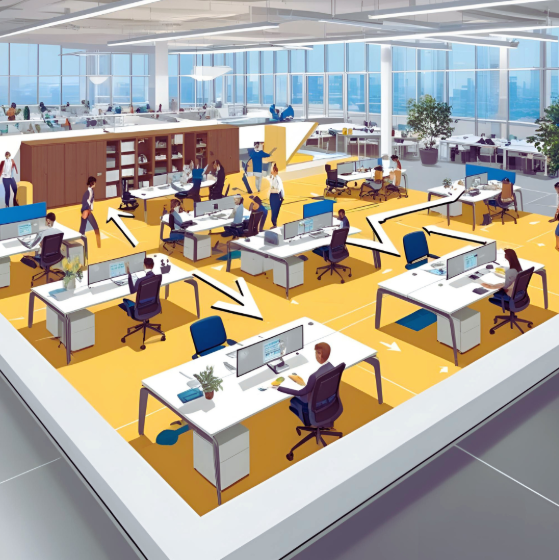
That’s why separating the space based on how people work can make a big difference. Here’s how to do this:
- Designate quiet zones for deep work. Quiet zones are areas set aside specifically for focused, heads-down tasks. Ideally, they should be located away from high-traffic spots like entrances, break rooms, kitchens, or shared pathways.
You can create this area by moving desks away from high-traffic zones—like entrances or break rooms—or by having employees wear headsets with a busylight feature, like the one on Jabra’s Evolve2 75 and Evolve2 85, to signal they’re in focus mode and shouldn’t be interrupted.
When Jessica Wright, the owner of Buy My Home Chattanooga, was combatting office noise, they created a quiet zone at work. “We established a quiet space where people could concentrate when necessary, without calls or conversations.
Although I was initially concerned that no one would use it, it is currently one of the most liked locations in the office.” - Make loud zones for collaboration. Work that involves talking—whether it’s team check-ins, brainstorming sessions, or informal chats—needs its own space, too. Loud zones give those conversations a place to happen without affecting people trying to concentrate.
These can be open seating areas, shared tables, or spots near meeting rooms where conversations naturally happen. - Move noisy equipment into loud zones. Printers, shredders, and other loud equipment shouldn’t sit right in the middle of quiet workspaces. Instead, relocate them to areas where people already expect some movement and sound, like near break rooms, shared utility areas, or entry points.
That way, the sounds that come with office life stay contained instead of spilling into spaces meant for focus.
2. Add noise-absorbing materials to the office
Sometimes, the key to handling office noise is to bring in materials that absorb sound instead of letting it bounce around. These minor (and sometimes cheap) upgrades can reduce echo, soften ambient noise, and make the work environment feel less chaotic.
Here’s what to bring into the space:
- Soft partition screens. These create a buffer between workstations, not just visually but acoustically. They absorb sound from nearby conversations and reduce how far voices carry across the room.
- Acoustic ceilings or panels. Sound tends to bounce off hard, flat ceilings. Acoustic tiles or panels can trap that sound and stop it from spreading, especially in rooms with high ceilings or open ductwork.
- Carpets or rugs instead of hard flooring. Hard surfaces like tile or concrete amplify footsteps, chair scrapes and general movement. Carpets or area rugs absorb that impact noise, making movement feel quieter and less distracting.
- Upholstered chairs or wall panels. Furniture can double as a sound buffer. Upholstered seating or wall-mounted fabric panels absorb sound rather than reflect it, which reduces noise in a subtle, effective way.
- Bookshelves. When filled with soft-backed items like paperback books, fabric bins, or files, bookshelves can break up sound waves and absorb noise instead of letting it carry across the room.
If possible, combine two or more of these noise-absorbing materials.
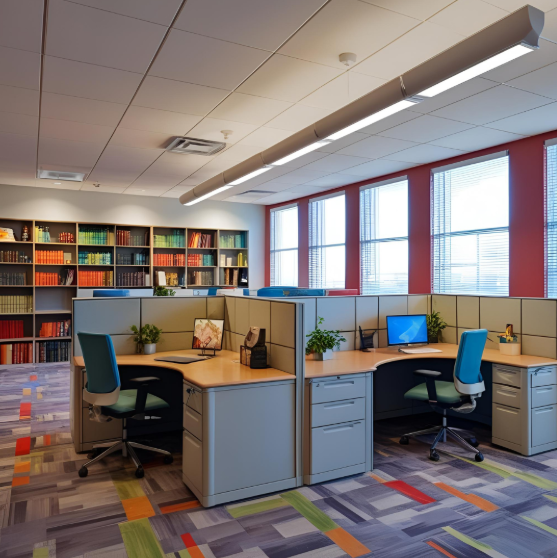
For example, Raoul Schweicher, the Managing Partner at MSadvisory, tackled his office’s noise problem (85+ decibels daily) by incorporating “floor-to-ceiling sound baffles, heavyweight fabric panels, and bookcase barriers filled with old documentation binders.”
Using a sound level meter to track the results, Raoul measured a 37% reduction in noise.
Of course, not everyone can roll out office-wide upgrades like this. If you're working in a space you can't change, professional-grade headsets—like Jabra’s Evolve2 series—offer a practical workaround.
Unlike typical noise-canceling headphones that struggle with speech, these are specifically built to block out conversational noise and keep you focused, even when the office isn’t quiet.
3. Restructure the office layout
Not every team works the same, and your office layout should reflect that. When teams that naturally talk more (like customer support and sales teams) are placed right next to quieter teams (like finance or design teams), the result is constant disruption.
David Li, the owner of Mountain View, realized this when furniture and partitions alone didn’t help reduce office noise. “The entire office layout was working against us. The loudest people (sales, marketing, and support) were smack in the middle of the space, with engineers and writers stuck listening to their every conversation.”
So, he flipped the layout by moving collaborative teams near windows, where natural light boosted energy and their chatter had fewer surfaces to bounce off. The deep-work teams went to the center, shielded by soundproof bookshelves and fabric-covered partitions.
“It was like watching the water flow into the right channels,” David said. “We stopped noticing the noise problem within weeks, not because it disappeared completely, but because the right people were making noise in the right places.”
If you’re facing the same problem:
- Group talk-heavy teams near active zones. Place customer-facing teams like sales or support closer to meeting rooms, collaboration areas, or break zones—places where conversation and movement are already part of the flow. That way, their noise blends into spaces where it makes sense, not where it disrupts deep work.
And if you’re worried that noise will seep into customer calls, using headsets with noise-canceling microphones (like Jabra’s Evolve2 headsets) can help keep conversations crisp in busy areas. - Position quiet teams in low-traffic areas. Move quiet teams, like design and engineering, toward the edges of the office, away from walkways, kitchens, and shared equipment. This way, there’ll be fewer interruptions, fewer distractions, and better concentration.
- Use furniture to create subtle sound buffers. Use tall shelves, cabinets, or storage units between loud and quiet zones to break up sound paths. Even soft dividers or strategically placed seating can help reduce noise transfer without changing the floor plan.
4. Introduce quiet hours
Sometimes, the problem isn’t just the noise—it’s the constant stream of small interruptions that break your concentration. One way to protect focus time is to introduce quiet hours.
The idea is simple: block off a few hours each day (or a couple of times a week), where the entire team agrees to limit interruptions and keep noise to a minimum. No impromptu desk chats, no loud calls at your workstation, and no small talk right next to someone trying to concentrate.
This method works for Ashot Nanayan, the founder of Digital World Institute (DWI). “We introduced ‘focus time’—generally between 9 AM and 12 PM—for exclusive and uninterrupted work,” said Ashot. “During this period, we advised employees to turn off Slack notifications, minimize phone calls, and limit meetings to those that are genuinely needed.
As a result, there has been a 40% improvement in employee satisfaction concerning the working environment, with many quoting improvements in their ability to concentrate.”
A few things to keep in mind:
- Pick time slots that work for the team. Whether it’s 9 am –12 pm, like Ashot chose, or 2 pm - 4 pm, choose windows when employees are most likely to benefit from deep, focused work.
- Consistency matters. Quiet hours work best when they become part of the regular schedule, not something people have to guess or remember on the fly.
- Communicate it clearly. Add quiet hours to a shared team calendar, post a reminder in your team chat, or simply give people a heads-up. The more visible it is, the easier it is to stick to.
- Use visible reminders. Headsets with busy lights, a notice-board, or some other hint to remind people that it’s still quiet time.
5. Train the talkers (gently)
Sometimes, people get caught up in conversations, take calls without thinking about who’s around, or don’t notice how far their voice carries in an open space. Gently raising awareness about office noise can encourage better habits without making anyone feel singled out or uncomfortable.
Here are a few ways to do that:
- Informal team discussions about noise awareness. Bring up the topic of noise reduction casually in a team meeting. Something as simple as, “Let’s try to be mindful of how noise travels, especially in shared zones,” plants the idea without calling anyone out.
When you frame noise reduction as a shared goal rather than a critique, people are more likely to take it on board and self-adjust. - Offer private, friendly reminders when needed. If someone regularly speaks loudly or takes calls at their desk, a quick one-on-one conversation can help. Keep the tone light—mention how it affects focus for nearby teammates, not as a complaint, but as a heads-up. This can make them more mindful moving forward without any awkwardness.
- Lead by example. When managers and team leads step away to take calls, use quiet zones for deep-focus work, and keep desk conversations brief, that behavior sets the tone for everyone else. You don’t need to say much—just modeling considerate habits creates a ripple effect across the team.
- Give people tools to adjust their environment. Offering options like using a call room, a meeting pod for long conversations, or a visual “focus mode” indicator (like the busy light feature on Jabra’s Evolve2 headset series) helps people adjust without confrontation.
6. Draft a noise etiquette policy
A noise etiquette policy is a way to set shared ground rules so everyone’s on the same page about what’s considerate in a shared workspace. It’s not about policing behavior but helping everyone be more mindful of how sound affects others.
Here are a few things that could go in the policy:
- Use messaging tools first. Encourage folks to send a quick message on Slack or Teams before approaching someone in person. A brief “Got a minute?” can give that person the space to finish what they’re working on instead of being interrupted mid-task.
- Keep your voice down in shared areas. Whether it’s a hallway chat, a casual catch-up in the kitchen, or a quick desk convo, reminding teams to keep their voices low in shared spaces helps maintain a calmer atmosphere without stifling human interaction.
- Take calls in designated phone booths or meeting rooms. Taking phone calls in shared workspaces can distract other employees. A simple guideline to take all calls in enclosed rooms or booths gets rid of that disruption and creates a clearer separation between quiet and loud zones.
- Mute notifications during quiet hours. Recommend muting or silencing notifications during agreed-upon quiet hours or switching devices to vibrate if total silence isn’t realistic. It's a small change that makes shared spaces feel less reactive and more intentional.
- Use speakers only in appropriate zones. If someone needs to play audio—whether it’s a quick training video, a webinar, or a voice note—encourage them to wear headphones or move to a collaborative/loud zone.
- Respect quiet zones. If a space has been marked for deep work, treat it that way. Keep conversations short and purposeful, or better yet, have them in another part of the office.
Why common fixes don’t work alone (and what to do instead)
If you’ve ever tried to block out office noise yourself, chances are you’ve already tested a few of the usual fixes, like noise-canceling headphones, white noise and ear plugs. And while they might take the edge off, they don’t always solve the real problem...especially when it’s speech that keeps breaking your focus.
Here’s why these go-to solutions fall short:
- Consumer-grade noise-canceling headphones help, but not completely.
They’re great at filtering out low background hums like heating and cooling systems or distant traffic, but human voices still cut through. And since speech is the most distracting sound in a workspace, that’s a huge limitation. - White noise apps can mask sound but need to be loud to block speech.
White noise works best for softening ambient noise (wind, traffic, office equipment). But when you need to block out conversation, you often have to turn them up so loud that they become distracting in their own way. Instead of helping you focus, it can add to the noise. - Earplugs block sound, but also connection.
Earplugs might reduce volume, but they also cut you off from everything else. You might miss important conversations and phone calls, or even just feel too isolated to stay in the zone. They’re not something you want to rely on all day.
These tools aren’t useless; they just aren’t designed to tackle the full problem on their own.
In this case, there are two things you can do: layer your noise-blocking solutions or invest in professional-grade noise-cancelling headsets.
Layer your noise-blocking solutions
If you work in a space where different types of sound compete for your attention, using just one noise-reduction tool isn’t enough. When you combine different methods, you can cover more types of sound and give yourself a better shot at staying focused.
- Earplugs + noise-canceling headphones
Earplugs help dull down background chatter and higher-pitched sounds, while noise-canceling headphones handle the steady hums like HVAC systems or distant traffic. Together, they block out both speech and ambient noise more effectively than either one on its own. - White noise + soft music
If earplugs aren’t your thing, try pairing a low white noise track with soft, instrumental music. The white noise smooths out the background, while the music keeps your brain just engaged enough to tune out voices.
Professional-grade noise-canceling audio equipment: A smarter fix
Layering noise-blocking tools can help in a pinch. But over time, it can feel overstimulating or even isolating. Instead of stacking one workaround on top of another, why not use gear that’s actually built to block out office noise?
Professional-grade headsets are designed to cut through office noise and help you concentrate on your tasks. Just put them on, and you’ve got your own focus zone right where you are.
However, before you invest in a pair of noise-cancelling headsets, it’s worth knowing that not all headsets are created equal.
Consumer-grade headsets/headphones are great for canceling out steady, low-frequency sounds like airplane engines or the hum of heating and cooling systems. But they often struggle with the real culprit in most offices: human speech. Voices fluctuate in tone, volume, and rhythm—and most regular ANC (Active Noise Cancellation) systems just aren’t tuned to deal with that.
On the other hand, professional-grade headsets, like Jabra’s Evolve2 75 or Evolve2 85, are built to tune out background noise as well as the dynamic, unpredictable nature of office conversations. These headsets cancel out speech frequencies more effectively, filter ambient sound during calls, and keep you in control of your environment without feeling disconnected.
Here’s what makes the difference:
- Active Noise Cancellation (ANC) optimized for speech
Most ANC technology is designed to reduce low-frequency sounds, like the wind and car honks, but Jabra’s professional headsets go further. Our advanced ANC technology works by detecting and analyzing incoming sound patterns, then producing a mirror “anti-noise” signal to cancel it out in real-time.
That means those background conversations that usually leak through consumer-grade headphones become significantly less noticeable, helping you stay in the zone longer.
The team at Superhub can attest to this:
“The headset sound quality is very clear, even when we’re moving around the office,” says ST Lee, Partner and Managing Director at Superhub. “The noise cancellation is great, even in the busy open office areas, and ensures good quality calls, which is especially important for our customer service team.” - Professional-grade microphones that reduce background noise on calls. If you’ve ever had to apologize mid-call because your mic picked up someone else’s conversation or the sound of a printer starting up—this is your fix. Our headsets use advanced microphone technology that isolates your voice and filters out surrounding noise. So, even if the space around you is chaotic, your audio stays crisp and clear on the other end.
- Built-in busy light to signal focus mode. Our Evolve2 headset series comes with a small but powerful feature: a busy light that automatically turns on when you’re on a call or meeting—or manually when you just need uninterrupted time. It’s a visual cue that lets coworkers know you’re working without you having to say a word.
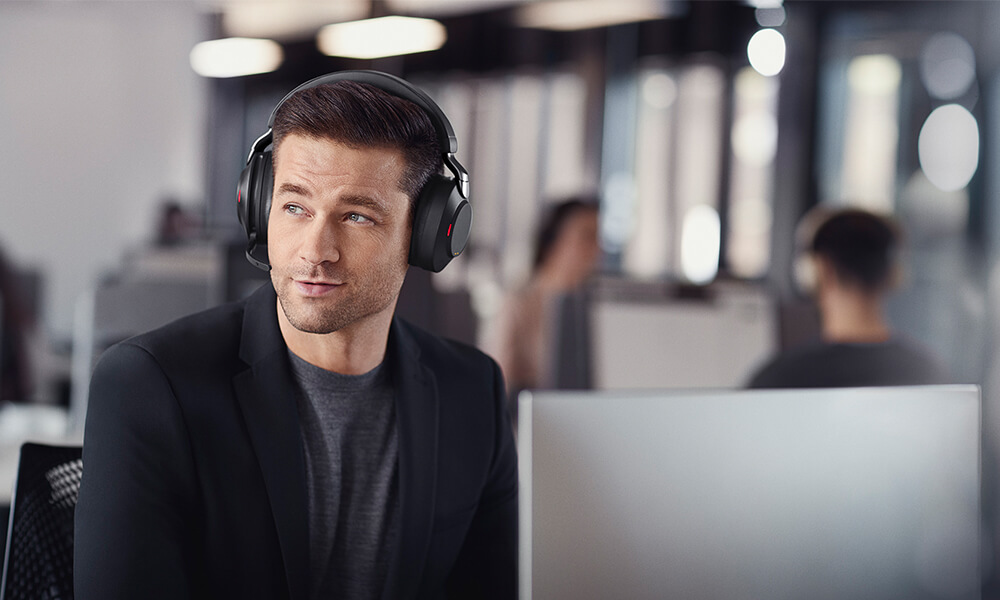
- Comfort you can wear all day. Heavy or rigid headphones can become their own kind of distraction, especially when you have to wear them all day. Our headsets are designed with lightweight frames, memory foam ear cushions, and flexible headbands that don’t pinch, press, or weigh you down. You get all-day comfort without ear fatigue or constant readjusting.
Match Your Workspace to the Right Jabra Headset
Not every work environment is the same, and not every headset should be either. Whether you're in an open-plan office, hopping between coworking spaces, or working from home, there’s a Jabra headset designed to help you stay focused and sound clear.
Here's a quick guide to help you choose the one that fits your setup best:
| Work environment | Recommended headsets | Why it works |
|---|---|---|
Open office | Jabra Evolve2 85 |
|
Shared desk/coworking | Jabra Evolve2 65 Flex |
|
Remote home office | Jabra Evolve2 65 Flex | Jabra Engage 55 SE |
Call-heavy roles | Jabra Engage 75 SE |
|
On-the-go/mobile work | Jabra Evolve2 55 |
|
When choosing the best Jabra headset for your needs, here are a few things to keep in mind:
- Jabra headsets aren’t just headphones—they’re built for work. Unlike standard headphones, Jabra’s headsets come equipped with high-quality microphones for calls and collaboration. But if you’re worried about bulk, don’t be—on models like the Evolve2 65 Flex and Evolve2 85, the mic boom folds neatly out of sight when you’re not on a call, making them easy to carry and more discreet.
- Earbuds can do the trick, too. If over-ear headsets aren’t your thing, but you still want strong noise cancellation, check out our Evolve2 Buds. They’re portable, true wireless earbuds packed with powerful ANC, a HearThrough button that lets in surrounding sound when needed, and MultiSensor Voice™ technology for crystal-clear calls—whether you’re at your desk or working on the move.
- Every Jabra Evolve2 headset includes a built-in busylight. It’s a simple but powerful way to show you’re in focus mode and prefer not to be interrupted. Read: Best Noise-cancelling Headsets for a Call Center
Don’t Just Cope—Take Back Control of Your Focus
A noisy office doesn’t have to be something you just deal with. Yes, some changes, like creating quiet zones, restructuring the office layout, and setting new policies, take time. But others, like using the right headset, can give you instant relief and help you focus better right away.
Jabra’s professional-grade headsets are built to block out different kinds of noise: speech, chatter, calls, equipment hum, background movement, and everything in between. Whether you’re in an open-plan office, working from home, hopping between coworking spaces, or taking meetings on the go, there's a headset designed to help you stay focused and in control.
Want to work in peace wherever you are? Explore Jabra’s headset range and find the right fit for your workspace.